The Bus
At this point, we have a good grasp on the main elements of the Graph itself, however on its own the Graph does nothing, it is just a glob of data waiting to be used. Which finally comes the time to present, the big boi, the machine, our precious conductor, AnimBus!
The AnimBus is the main engine of all animations of Depraved Sense. Their job is to store all necessary actors of a scene, sync them accordingly with the scenes (At least try to), and of course play the animations.
To make sure that multiplayer can be possible with Depraved Sense, the AnimBus lives on the server, and makes sure that all clients are on the same page when it comes to animations. The AnimBus also can have UNLIMITED actors. It can have 2, 3, or even 6 if you’re crazy enough to do the work for it.
For reference this is the body structure of an AnimBus:
---@class DS_AnimBus : ISBaseObject
---@field id string
---@field actors DS_AnimActor[]
---@field actor_join_queue DS_AnimActor[] W.I.P Will allow actors to join the bus mid scene.
---@field actor_exit_queue DS_AnimActor[] W.I.P Will allow actors to leave the bus mid scene.
---@field current_cell DS_AnimCell | nil
---@field current_phase DS_AnimPhase | nil
---@field cell_loops integer          Number of loops on the current cell
---@field phase_loops integer         Number of loops on the current phase
---@field _looped_actors boolean[]
---@field current_speed number        A Speed value percentage that goes from 0.0 to 1.0
---@field integrity number            This works as a life of a Bus. if it reaches 0, the bus crashes
---@field integrity_max number        The max integrity a Bus can have. Calculated by the amount of actors. The more actors the greater its health will be
---@field _integrity_per_actor number How much health does a single actor provide to the Bus.
---@field interrupted boolean
---@field stopped boolean
---@field anchor_x number
---@field anchor_y number
---@field anchor_angle number
---@field has_anchor boolean
---@field anchor_actor integer        Which actor is being used as an anchor. -1 means no one.

---The default values of a single bus during its creation.
---Will change after initialization.
local bus = {
	id = getRandomUUID(),
	actors = table.newarray({}),
	actor_join_queue = table.newarray({}),
	actor_exit_queue = table.newarray({}),
	current_cell = nil,
	current_phase = nil,
	cell_loops = 0,
	phase_loops = 0,
	_looped_actors = table.newarray({}),
	current_speed = 0.0,
	integrity = 0.0,
	integrity_max = 0.0,
	_integrity_per_actor = 10.0,
	interrupted = false,
	stopped = false,
	anchor_x = 0,
	anchor_y = 0,
	anchor_angle = 0,
	has_anchor = false,
	anchor_actor = -1,
}
The logic
First thing to note is that AnimBus was designed around animation loops. That decision makes sure that animations are played correctly, and are not cutoff in game unless forced to do so. It will only make decisions when it is created, and when a scene loops.
So, let us watch how an AnimBus acts with a few prepared graphs:
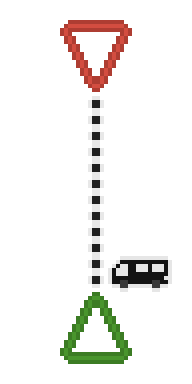
This is a very barebones scene with a single Ticket, Depot, and a Road. We’re using it just to see how things goes. In here we can see that the very first location that an AnimBus will be, is at a Ticket. Once the bus finishes starting it will immediately check all the available roads connected to the Ticket exits.
In this case the Road has no conditions imbued to it, so its always truthy for us. Which makes our bus move along its path. If the path had any transition animation put in it, it will play it for each assigned actor.
Note: In this specific case, thanks to the limitations of Zomboid, no animations will actually be played here. Those require the need of at least one Stage for animations to work. This example is just for learning purposes.

Once the bus reaches the depot and every actor finished their transition animation, the bus will stop, and release all the actors inside of it.
It will also apply every effect the cell has in its GateEntrance for each actor.
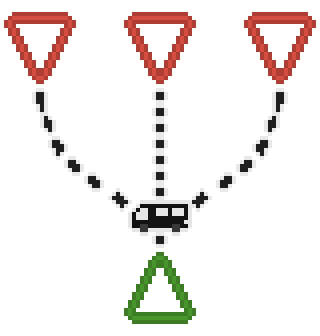

In here we have a similar situation like the previous example, however we have three Depots instead of one. And like previous scenario each road is truthy. When the AnimBus sees that it has multiple available paths to follow, it will pick a random one from its choice. In this example, it decided to go for the righmost path.
Now, let’s try something with a more complete design.
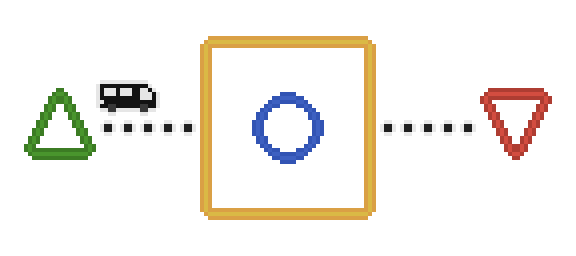
This example now has the simplest kind of scene constructed, including a Stage with a single Phase in it. This time, we will make only the Road leading to the Stage truthy, while leaving the Road to the Depot with a simple condition.
local conditions = {
    ---@param DS_AnimBus
    function(animbus)
        ---This code will only let the road be free if the AnimBus animations loop 4 times
        if animbus.cell_loops >= 4 then
            return true
        else
            return false
        end
    end
}
At first the bus will check the Stage requirements, and decide if its stored Actor list is compatible with what the Stage requires. If not, the bus will not accept the Road leading to it, but in this case both the AnimBus and Stage have the first actor to be the type of player.

Now, once arrived on the Stage the bus will pickup one Phase from it, and use it as an animation source for its actors. As we discussed earlier Stage can have multiple Phases, but to keep it simple we will keep it one for now.
Once the actors looped their animations, the bus will once again check the roads in their disposal. And on this occasion, the single Road has our specific condition included, and right now it doesn’t pass since our AnimBus loop count is at 1. So, it stays in place, and let the animations play one more time.
Once the AnimBus has looped 4 times, the road will finally be available to the AnimBus, which will let it finally pass by, reach the Depot, and end the scene.

With this, we essentially created a simple animation that loops 4 times, and ends. We could even improve it by adding Transitions on roads to make things smoother.
The Phases inside our Stages
Now, let’s move our eyes to another place. Suppose we have a common Stage like no other. However, this one has 3 different disconnected Phases.
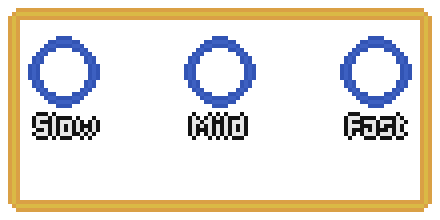
Normally, once an AnimBus arrives into the Stage it will check the Phases it has. And on this case it will randomly pick a Phase, position itself on it, and play its animations. With this you can in theory create scenes that can have Variant animations.
But what if we didn’t want that? What if these 3 phases had specific objectives? Let’s say we name these Phases: Slow, Mild, and Fast. Now we don’t want the AnimBus to simply arrive at the Stage, and out of nowhere stop at the Fast Phase.

Thankfully, Stage can look which Phases can be treated as start values (also called ignitions), which makes a Phase have priority over others. Using this to our favor we can set Slow as a start, and force the AnimBus to always start at it.
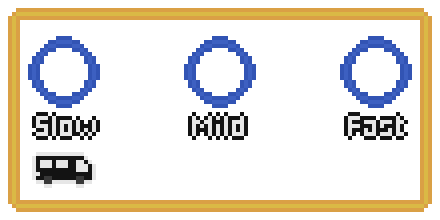
Great! Now we can assure that the radomness won’t be such a problem. However, these Phases are still disconnected. To change this we can connect them in a one way format, with each Road having a specific condition based on the AnimBus speed.
local conditions_to_mild = {
	function(animbus)
		return animbus.current_speed >= 0.40
	end
}

local conditions_to_fast = {
	function(animbus)
		return animbus.current_speed >= 0.75
	end
}
With it, the AnimBus will dynamically switch Phases as it updates its values, and it loops. In this case, the selected animation changes as the current_speed value grows.

Note: the animbus.current_speed is not the animation speed itself, but a value that Road can use in its conditions.