Custom Genitals
One of the features of Depraved Sense is having a modular way of handling animated genitals. It’s possible for players to choose their own prefered genital model if they dislike the base one. And without making every other player be forced to also change their own.
Anyone has the chance to create their own type, and register them for others to use. In here you will learn how to.
It is fairly expected that you have some basic knowledge of how to use Blender, the tool used in this guide.
Using The Base Model
To start making your custom genital, you need to first load BasePenis.glb onto blender. One thing to point out, is checking if is toggled on. Otherwise you might get duplicate vertices.
Note: If you prefer you can use the DepravedBodies.glb and use it referencing the main body.
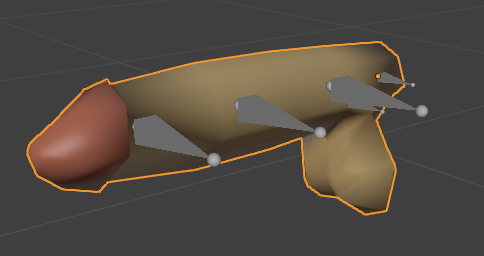
And, at this point, it is free reign. You can do about anything here, modify the current model, create one from scratch or even use another one at your disposal. As long as the model you use has the same armature from the BasePenis everything is okay!
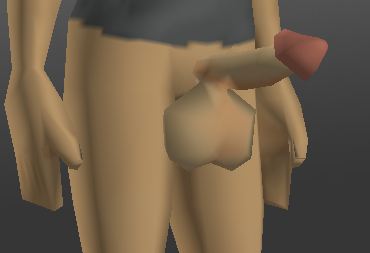
In this example, we are going to simply create a joke genital by deforming the penis.
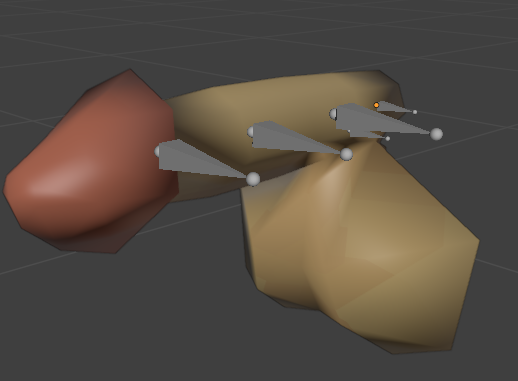
balls
When ready with your own creation, make sure to export it with glTF, and check if the needed objects are selected.
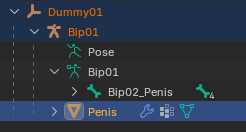
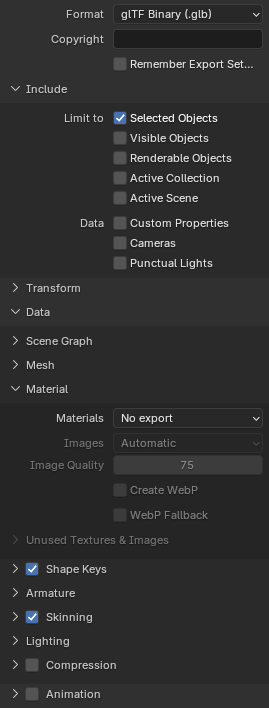
You will then store your precious model on common/media/models_X/genitals
Textures
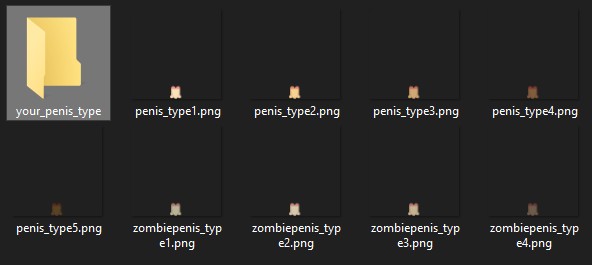
Before we go any further, we also need to create texture variants to your genitalia. You can check the needed textures at common/media/texture/genitals folder.
It’s also good to use them in your own model while creating them.
DO NOT INSERT YOUR TEXTURES IN THE SAME FOLDER OF THE BASE ONES! Or else you will replace the current ones. Try creating a specific folder for them to make sure they don’t override existing ones. For example, in this case we created a folder named joke_type, and we’re going to store our textures there. Remember that folder’s name, it will become important real soon.
Creating The Genital Item
If you are not aware, penises are actually clothing items under the hood. Well, they aren’t clothes in theory, but in the game side, they are.
Item XML
At common/clothing/clothingItems we are going to create an XML file for our genital. But first, we need to generate an UUID code for our item. You can obtain a code in many ways, but in here we’re going to use this site to get ours. In this case we got 8c9f1a7e-e0a9-4b38-b8d1-fae6a93f0e0d. (UUID code is essentially a sequence of characters so random, that it practically makes our item unique.)
And as you may have guessed, the XML name also must be unique. Try naming it something very specific for your case. In here, we’re going to call it DS_TestBasePenis.xml
XML Format
This is the base format
<?xml version="1.0" encoding="utf-8"?>
<clothingItem>
	<m_MaleModel>genitals/PENIS_MODEL_NAME</m_MaleModel>
	<m_FemaleModel>genitals/PENIS_MODEL_NAME</m_FemaleModel>
	<m_GUID>YOUR_GENERATED_UUID</m_GUID>
	<m_Static>false</m_Static>
	<m_AllowRandomTint>false</m_AllowRandomTint>
	<m_AttachBone></m_AttachBone>
    <!--
        This is a texture that allows for the penis to be invisible
        when clothes are in the way.
    -->
	<textureChoices>invisible</textureChoices>
    <!--
        At this point, the texture paths in here will be used by the penis
        for different tints of the body.
        The paths are in relation to the `textures` folder.
    -->
	<textureChoices>genitals\YOUR_TYPE_FOLDER\penis_type1</textureChoices>
	<textureChoices>genitals\YOUR_TYPE_FOLDER\penis_type2</textureChoices>
	<textureChoices>genitals\YOUR_TYPE_FOLDER\penis_type3</textureChoices>
	<textureChoices>genitals\YOUR_TYPE_FOLDER\penis_type4</textureChoices>
	<textureChoices>genitals\YOUR_TYPE_FOLDER\penis_type5</textureChoices>
	<textureChoices>genitals\YOUR_TYPE_FOLDER\zombiepenis_type1</textureChoices>
	<textureChoices>genitals\YOUR_TYPE_FOLDER\zombiepenis_type2</textureChoices>
	<textureChoices>genitals\YOUR_TYPE_FOLDER\zombiepenis_type3</textureChoices>
	<textureChoices>genitals\YOUR_TYPE_FOLDER\zombiepenis_type4</textureChoices>
</clothingItem>
You can also check the exact XML parameters at the wiki
In our case the final XML will be:
<?xml version="1.0" encoding="utf-8"?>
<clothingItem>
	<m_MaleModel>genitals/JokeBasePenis</m_MaleModel>
	<m_FemaleModel>genitals/JokeBasePenis</m_FemaleModel>
	<m_GUID>8c9f1a7e-e0a9-4b38-b8d1-fae6a93f0e0d</m_GUID>
	<m_Static>false</m_Static>
	<m_AllowRandomTint>false</m_AllowRandomTint>
	<m_AttachBone></m_AttachBone>
	<textureChoices>invisible</textureChoices>
	<textureChoices>genitals\joke_type\penis_type1</textureChoices>
	<textureChoices>genitals\joke_type\penis_type2</textureChoices>
	<textureChoices>genitals\joke_type\penis_type3</textureChoices>
	<textureChoices>genitals\joke_type\penis_type4</textureChoices>
	<textureChoices>genitals\joke_type\penis_type5</textureChoices>
	<textureChoices>genitals\joke_type\zombiepenis_type1</textureChoices>
	<textureChoices>genitals\joke_type\zombiepenis_type2</textureChoices>
	<textureChoices>genitals\joke_type\zombiepenis_type3</textureChoices>
	<textureChoices>genitals\joke_type\zombiepenis_type4</textureChoices>
</clothingItem>
fileGuidTable
To make Project Zomboid read our xml, we actually need to inform it where it is located. We do it by creating a fileGuidTable.xml in our media root. This file is used by Zomboid to refer where our XML is and load it. In our specific case the file will end up being:
<?xml version="1.0" encoding="utf-8"?>
<fileGuidTable>
	<files>
		<path>media/clothing/clothingItems/JokePenis.xml</path>
		<guid>8c9f1a7e-e0a9-4b38-b8d1-fae6a93f0e0d</guid>
	</files>
</fileGuidTable>
Making the Item Script
Now, it’s time to create the clothing item itself for the game. Creating an item on itself is already a topic on its own, but in here we’re going to focus on using the base format for our genital.
First we need to create a script file at script/clothing, and in here we’re going to name it joke_penis.txt. Again, the file name NEEDS to be unique to avoid any override against other mods. More about item scripts in here.
module YOUR_MODULE_NAME
{
    item THE_NAME_OF_YOUR_PENIS_TYPE
    {
        DisplayName = Penis,
        DisplayCategory = Clothing,
        ItemType = base:clothing,
        Hidden = true,
        ClothingItem = THE_NAME_OF_ITS_XML,
        BodyLocation = base:dress,
        Tags = depravedsense:penis;depravedsense:genital,
    }
}
Translating to our case scenario:
module DepravedTest
{
    item JokePenis
    {
        DisplayName = Penis,
        DisplayCategory = Clothing,
        ItemType = base:clothing,
        Hidden = true,
        ClothingItem = JokePenis,
        BodyLocation = base:dress,
        Tags = depravedsense:penis;depravedsense:genital,
    }
}
The most important part of this script, is the tags, they are what makes it possible for Depraved Sense to find it when scanning characters. In here we are adding a penis, and genital tag.
Registering Our Genital
Alright, at this point our penis lives inside Project Zomboid, however we still need to register the item to Depraved Sense so it is possible for other players to use it in their characters.
Create a .lua file at media/lua/shared/YOUR_MOD_NAME/genital_registry.lua. Its name doesn’t need to be genital_registry.lua, it can be whatever name you want. But in this case we’re using that nomenclature.
To register our penis, we will require the GenitalsMap module of Depraved Sense, and register our genital based on our item script.
local GenitalsMap = require("DepravedSense/Genitals/GenitalsMap")

---The first parameter will be the name of our module at the script we just made,
---and the second parameter the name of our item type.
GenitalsMap.add_penis_item("DepravedTest", "JokePenis")
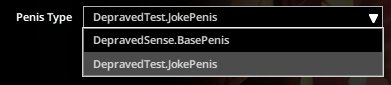
And… That’s it! If every step was followed correctly, your genital should be added to the game, and other people can use it at their pleasure!
Just look at this aberration we just added!
dear god.